
Is Riverside Worth It? A Real Look at the All-In-One Podcasting Platform

I've been using Riverside on and off for a while now, and on the last episode of Dialed In, I finally sat down and walked through what it actually does, what it costs, and whether it's worth your money. This isn't a sponsored rundown. It's just me digging into a tool I'm currently paying for and trying to decide if I'm going to keep paying for it.
So let's get into it.
What Riverside Actually Is
Riverside has turned into an all-in-one platform for podcasting: recording, editing, live streaming, newsletter, podcast hosting, and a podcast website, all under one roof. If you know Substack, it's a similar idea. A lot of companies are doing this lately, branching out into territory that used to belong to five different tools. Jack of all trades, master of none, maybe. That's something you have to decide for yourself.
For me, that's the real question: do I keep using Riverside, or do I go back to piecing together different tools for different jobs?
The Pricing Breakdown
There's a 14-day free trial to start. After that, here's roughly what you're looking at (billed monthly):
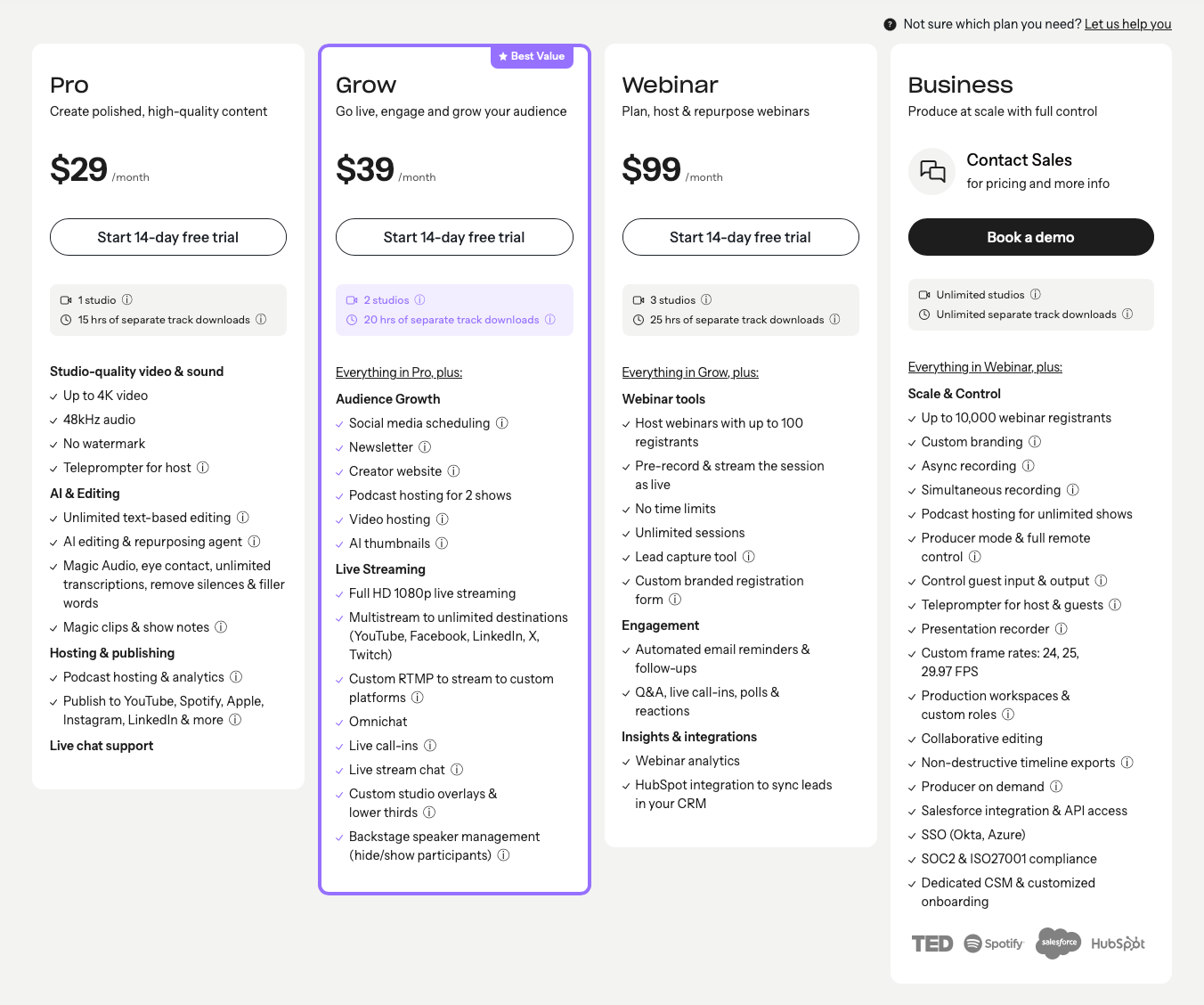
- Pro, around $29/month: 4K recording, no watermark, teleprompter, unlimited text-based and AI editing, magic audio, unlimited transcription, silence and filler word removal, podcast hosting and analytics, and one-click publishing to YouTube, Spotify, Apple, Instagram, LinkedIn, TikTok, X, WhatsApp, and Telegram.
- Next tier up, around $39 to $40/month: everything in Pro, plus social media scheduling, newsletter, podcast hosting for two shows instead of one, and video hosting you can embed anywhere without YouTube's end-of-video recommended videos pulling your audience to someone else's channel.
- Webinar tier: built for businesses and nonprofits. Up to three studios, three podcasts, webinars for up to 100 registrants, pre-recorded streams, no time limits, and lead capture tools.
- Enterprise tier: this is the big one. Some people have stated they were quoted around $400 a month. Unless you're running something at real scale, this one isn't for the average maker or solo creator.
What You Actually Get for the Money
The video hosting piece is worth calling out on its own. It's similar to what you'd get from something like Bunny.net: CDN, transcoding, storage, the works, but Riverside bundles it into the flat monthly fee instead of charging you per gigabyte. That matters if you're embedding video on your own site and don't want YouTube's algorithm quietly steering your traffic away.
Recording quality holds up too: 4K video, high-quality audio. The editing suite is text-based, similar to Descript or Gling AI, with separate tracks per speaker, AI noise cleanup (they call it magic audio), automatic filler word and silence removal, and the ability to export horizontal or vertical versions of the same recording.
Live streaming is genuinely solid. Everything runs through the browser, no software to install, and you can multistream to YouTube, Twitch, Facebook, Instagram, LinkedIn, TikTok, X, and custom RTMP destinations. You get omni-chat pulled in from connected platforms, live call-ins, custom overlays, and lower thirds. I was actually streaming this episode through Riverside while talking about it.
Hosting and the newsletter tool are newer additions, maybe the last six months or so. Moving your podcast RSS feed over is the same process you'd go through with Captivate, Fireside, Transistor, or Buzzsprout. Straightforward, just takes a little patience with the redirect.
Where It Still Falls Short
I'll be honest about the rough edges. The analytics aren't as deep as what you'd get from a dedicated hosting platform, though they've clearly been improving. The AI-generated show notes and titles need real editing. I tried getting it to write a YouTube title under 50 characters, and it just kept handing me lists that ignored the constraint. And there's no Safari support right now; you need Chrome or Edge, which is a real limitation depending on your setup.
For my show notes, I still run my transcript through Claude instead of Riverside's built-in AI. It keeps my conversational tone and actually listens when I ask for something specific.
So, Worth It or Not?
I'm currently 30-some days into a paid trial (found a promo code that stacked on top of the free trial), and I'm using that window to actually test it against my real workflow before deciding whether to keep paying for it. Riverside isn't for everybody. If you're happy with your current setup of separate tools, there's no reason to switch just because this exists. But if you're tired of juggling five subscriptions for recording, editing, hosting, and distribution, it's worth the two weeks it takes to try it yourself.
If you want the full breakdown with pricing screens and a look at the live streaming setup in action, check out the full episode of Dialed In on YouTube or wherever you get the podcast. Let me know in the comments if you've used Riverside and what your experience has been.
Written by

Subscribe to my newsletter
Subscribe to my newsletter to get the latest updates and news








Member discussion